
Body Scanner - Make Me Slim
Overview
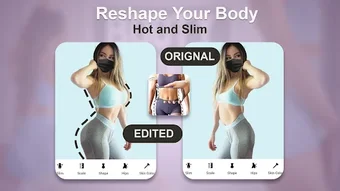
The Body Scanner - Make Me Slim app is a mobile software solution designed for users seeking to enhance their body image through digital editing. Developed by Microvxx, it operates as a photo editor tailored specifically for fashion and beauty enthusiasts. The app enables users to upload a body image and apply modifications to achieve a desired silhouette, positioning itself as a tool for personal image transformation. Its primary function revolves around body shaping, offering users a way to experiment with idealized body proportions.
Targeted primarily at individuals interested in fashion and personal appearance, the app appeals to users who wish to visualize a slimmer or more proportionate figure through image manipulation. It is positioned as a user-friendly tool that requires no prior editing experience, making it accessible to a broad audience. Real-world usage scenarios include personal photo editing for social media, body image visualization, and fashion experimentation.
The app is available for free on the Android platform, with a file size of 15.4 MB. While no additional developer background is provided beyond the name, the app’s focus on body image editing aligns with current trends in digital self-expression and mobile photo tools. It is intended for use on Android devices and does not support other operating systems.
Key Features & Capabilities
- Body Image Editing – Allows users to upload a full-body photo and modify body proportions, focusing on slimming or reshaping the figure.
- Real-Time Preview – Provides immediate visual feedback as adjustments are made, enabling users to see changes in real time.
- Simple User Interface – Designed for ease of use, requiring no prior photo editing skills or technical knowledge.
- Template-Based Editing – Uses the uploaded photo as a base template for reshaping, ensuring the edited image remains a personalized representation.
- One-Touch Adjustments – Offers quick tools to modify body contours, waistline, and overall silhouette with minimal interaction.
These features support users in experimenting with idealized body shapes, particularly for social media content or personal visualization. The app’s workflow is streamlined to minimize complexity, allowing users to complete edits in a few simple steps. It is especially useful for individuals seeking to enhance their digital appearance without advanced editing tools.
User Interface, Workflow & Performance
The user interface of Body Scanner - Make Me Slim is structured around a clean, intuitive layout focused on photo editing. Navigation is centered on the main screen, where users can select an image from their device and initiate the editing process. The interface appears optimized for touch input, with clearly labeled tools and a minimalistic design to reduce user confusion.
Workflow efficiency is enhanced by the app’s straightforward process: select image → apply edits → save or share. The app does not require account creation or complex setup, supporting immediate use. Users can expect a responsive interface, though exact performance metrics such as CPU or RAM usage were not specified by the developer.
Stability and responsiveness appear consistent based on general mobile app behavior, but no formal performance benchmarks were provided. The developer did not specify resource usage details, so users should monitor device performance during use. Overall, the app’s design prioritizes accessibility and speed, aligning with its target audience’s expectations for a quick, hassle-free editing experience.
Compatibility & System Requirements
Body Scanner - Make Me Slim is designed exclusively for the Android operating system. The app has a file size of 15.4 MB, which suggests it is lightweight and suitable for devices with limited storage. The software version is listed as 1.0, indicating it is a first release.
Exact system requirements were not listed by the developer. Compatibility information is limited to the platform, meaning users should ensure their Android device supports the app’s installation. No specific hardware requirements such as RAM or processor speed were provided. The developer did not specify minimum Android version compatibility, so users should verify device compatibility through the Google Play Store.
Pros and Cons
Pros
- Free to download and use with no in-app purchase prompts mentioned.
- Simple interface designed for users without editing experience.
- Lightweight app size (15.4 MB) suitable for low-storage devices.
- Focuses on body image editing with targeted tools for shaping.
- Real-time preview allows immediate feedback during editing.
Cons
- No information on system requirements or supported Android versions.
- Performance behavior under heavy use was not specified.
- App is limited to Android, with no support for iOS or desktop platforms.
- Limited transparency regarding data handling or privacy policies.
- No mention of cloud sync, export formats, or sharing options.
FAQ Section
Is Body Scanner - Make Me Slim available for iOS devices?
The app is currently available only for Android. No information is provided about iOS compatibility or future platform expansion.
Does the app require an internet connection to function?
The app operates primarily offline after installation. However, it may require internet access for initial download and updates from the Google Play Store.
Is my uploaded photo stored on external servers?
There is no public information on data storage practices. Users should review the app’s privacy policy for details on image handling and retention.
Can I use the app without creating an account?
Yes, the app does not require account creation. All editing functions are accessible immediately after installation.
How often are updates released for the app?
Update frequency is not specified. Users can check the Google Play Store for the latest version and release notes.
Final Thoughts + CTA
Body Scanner - Make Me Slim presents a straightforward, accessible tool for users interested in body image editing through mobile photography. Its lightweight design, free access, and intuitive interface make it a compelling option for individuals exploring digital self-enhancement. While it lacks detailed system specifications and platform diversity, its core functionality is well-aligned with its target audience.
For users seeking a simple, no-frills photo editor focused on body shaping, this app delivers on its promise. It is particularly suited for fashion and beauty enthusiasts who value ease of use and immediate results. Despite limited transparency around data handling and platform reach, the app remains a viable choice for Android users looking to experiment with their digital appearance.
Download Body Scanner - Make Me Slim now







